
- Define what the board must do
- Plan the architecture and choose parts
- Draw the schematic
- Set the stack-up and place parts
- Route power and signal traces
- Run design rule checks and a review
- Generate the manufacturing files
- Bring up and test the prototype
In the guide below, every step is explained using an example. You will also find a full checklist near the end, free to copy straight from the page.
How to design a Printed Circuit Board?
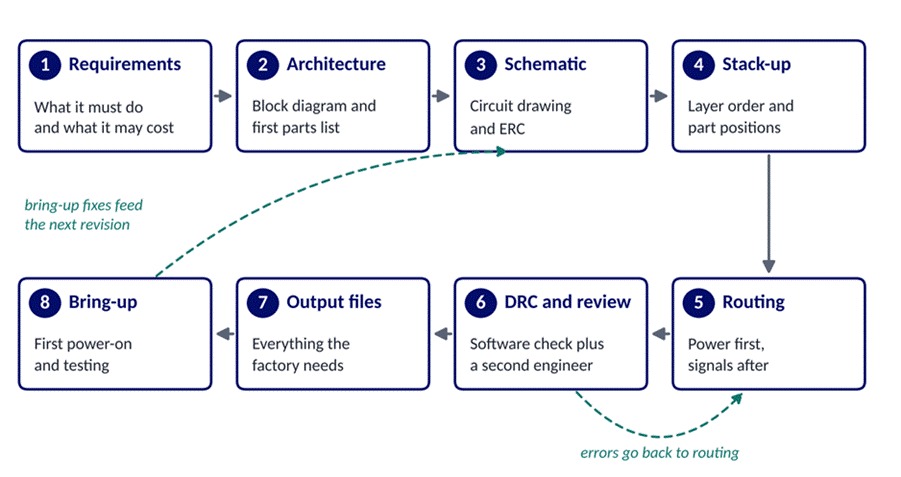
Figure 1. The eight steps of PCB design, with the two loops where problems send work back.
Step 1: Define the Requirements
A requirements sheet records what the board must do and the limits it has to work within, from the supply voltage down to the price of each unit. Writing it before opening any design tool prevents the costliest kind of rework, the kind that starts after boards arrive.
Firmware needs belong on the same sheet, because the circuit has to give the code what it expects. For the logger, that means a header for the first programming and enough flash memory to accept updates sent over Wi-Fi.
Cost and volume shape every later choice, since a board built 500 times a year can use parts that a 50,000-unit product would drop on price. Table 1 shows a filled-in sheet for the example logger.
| Requirement | Example logger entry |
| Function | Read temperature and humidity every minute and send readings over Wi-Fi |
| Power | 5 V from a USB-C wall adapter |
| Size | Fits an 80 by 60 mm wall-mount enclosure |
| Environment | Works from minus 25 °C to 10 °C in condensing moisture |
| Firmware | Programming header and room for updates over Wi-Fi |
| Cost and volume | Parts under ₹1,200 per board, 500 boards a year |
Table 1. A filled-in requirements sheet for the example cold-room temperature logger.
Environment entries deserve the most care, because a cold room with condensing moisture calls for a protective coating and parts rated well below freezing. Commercial-grade chips typically stop at 0 °C, so the logger needs industrial-grade parts rated down to minus 40 °C.
Step 2: Plan the Architecture and Choose Components
This step produces two things: a one-page block diagram and a first parts list with real part numbers. Both are cheap to change now and costly to change once copper is drawn.
1. Draw a Block Diagram
Each box on the diagram is a function, such as the power supply or the sensor, and each line marks how two boxes talk to each other. Figure 2 shows the logger, where a USB-C input feeds a 3.3 V regulator that powers both the Wi-Fi module and the sensor.
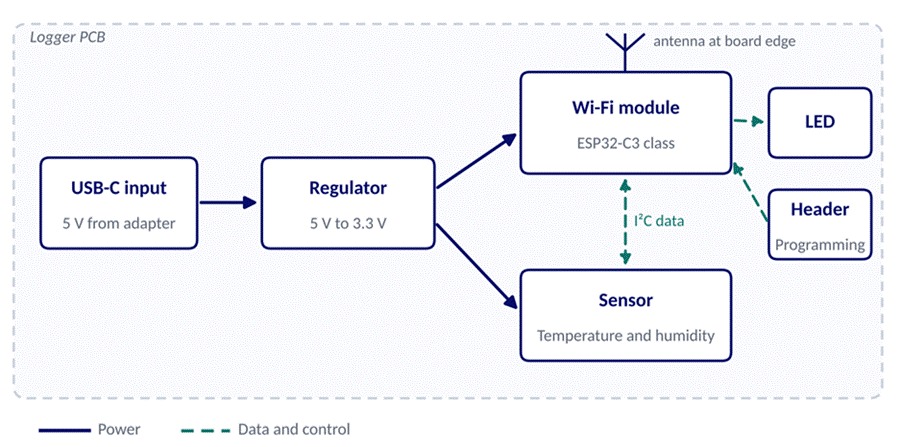
Figure 2. Block diagram of the example cold-room logger, from USB-C input to the Wi-Fi module and sensor.
2. Choose Parts You Can Still Buy Later
Pick parts with several years of production ahead and at least two distributors holding stock, and list an approved alternate for anything with a single source. Good choices for the logger include an ESP32-C3 Wi-Fi module from Espressif and an SHT40 sensor from Sensirion, both common and well documented.
Check each part's lifecycle status on the maker's product page before it goes on the list. Parts flagged as nearing end of life belong on the reject pile, however good the price looks.
3. Add Up the Power Budget
Budgeting power means listing the current each part draws at its busiest moment, then adding a safety margin. If the module's datasheet shows a 350 mA peak during Wi-Fi transmit and the sensor and LED add 10 mA, a regulator rated for 500 mA or more leaves comfortable headroom.
BY THE NUMBERS
Parts can disappear quietly
Z2Data, a supply chain analytics firm, counted 621,909 part numbers that reached end of life in 2025, and makers announced only 48 percent of them with a formal change notice. Checking your parts list every quarter catches the rest before they stop a production run.
Step 3: Draw the Schematic
Think of the schematic as the circuit drawing, with every part shown as a symbol and every connection as a line, since the board layout is built directly from it. Clarity matters as much as correctness here, since a colleague will review this drawing in Step 6.
1. Split the Circuit Into Sheets
Hierarchical sheets keep large designs readable, with the power supply on one sheet and the processor on another. Our logger fits on two sheets, while a board with a display and a motor driver might need six.
2. Name Every Net
Nets are the wires that join two or more pins, and design tools give unnamed ones codes like Net-(U3-Pad7) that tell a reviewer very little. Names such as SENSOR_SDA or 3V3_MAIN make layout and later debugging far quicker, because the name appears on screen in the board editor.
3. Run the Electrical Rule Check
The electrical rule check, or ERC, scans the drawing for mistakes such as two outputs driving one wire or a power pin left floating. Treat each warning as a question to answer, and mark the intentional ones so the next run comes back clean.
4. Assign and Check Footprints
Each symbol needs a footprint, the pattern of copper pads the part solders onto, and a wrong one can leave a chip impossible to fit. Compare each footprint with the recommended land pattern in the part's datasheet, paying closest attention to pin 1 and pad spacing.
Step 4: Set the Stack-Up and Place Components
Layout starts with two physical decisions, the order of the copper layers and where each part sits. Get both right and the routing in Step 5 becomes far simpler.
1. Choose a Stack-Up
Inside every board sits a stack-up, the order of copper and insulating layers, much like the layers of a sandwich. Figure 3 shows the common arrangement the logger uses, with signals on the two outer layers and solid ground and power layers in the middle.
Ask your board maker for its standard stack-up before you start. Matching it keeps the price at the standard rate and avoids special material orders that add weeks.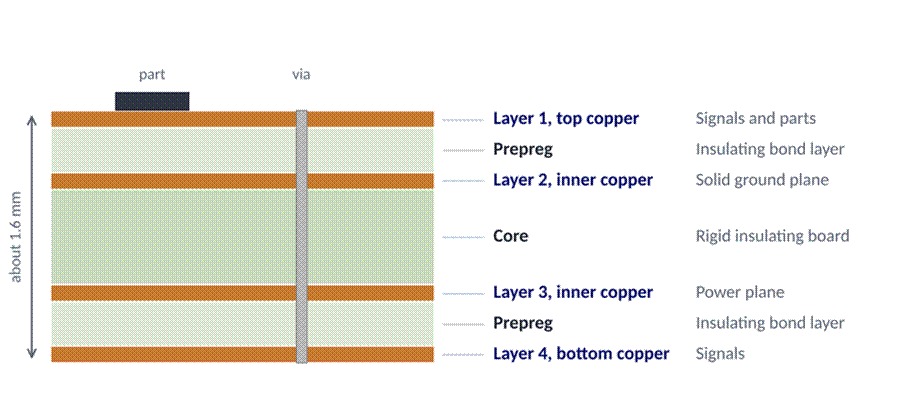
Figure 3. A common four-layer stack-up, with signal layers outside and ground and power planes inside.
2. Fix the Board Outline First
Draw the board edge and mounting holes from the enclosure drawing before placing anything else, then lock them in place. Connectors come next, since a USB-C socket must line up with the case opening to within a fraction of a millimetre.
3. Place Parts in Order of Priority
After the connectors, place the parts whose position affects performance, starting with the regulator and its capacitors. Next comes the Wi-Fi module, with its antenna at a board edge. Decoupling capacitors, the small capacitors that steady each chip's supply, belong right beside the power pins they serve.
Everything else fills in around these anchors, and test points for each power rail go where a probe can reach them on the finished board. Keep the temperature sensor well away from the regulator, which warms up in use and would skew the readings.
Step 5: Route Power and Signal Traces
Routing draws the copper connections between parts, starting with power and ground before the signals that are sensitive to noise. Simple lines like the one driving a status LED can take whatever path is left at the end.
1. Size Traces for Current
Wider copper carries more current, just as a thicker household wire does, and a trace that is too thin for its load heats up. Table 2 gives starting widths worked out from the formula in the IPC-2221 design standard for standard 1 oz copper and a 10 °C rise above room temperature.
| Current | Outer layer width | Inner layer width |
| 0.5 A | 0.12 mm (4.5 mil) | 0.30 mm (12 mil) |
| 1 A | 0.30 mm (12 mil) | 0.78 mm (31 mil) |
| 2 A | 0.78 mm (31 mil) | 2.03 mm (80 mil) |
| 3 A | 1.37 mm (54 mil) | 3.56 mm (140 mil) |
Table 2. Starting trace widths from the IPC-2221 formula for 1 oz copper and a 10 °C rise, to be confirmed by your engineer.
Inner layers need about two and a half times the width for the same current, because heat escapes more slowly from inside the board. Where limits are tight, the newer IPC-2152 standard gives more accurate sizes that account for nearby planes and board thickness.
2. Give Power and Ground Their Own Planes
A ground plane is a solid sheet of copper that gives signals a short, direct path back to its source. Keep that sheet whole, since a slot cut across it forces return currents to detour around the cut and turns the board into a small radio antenna.
Vias, the small plated holes that carry a connection between layers, each add a little resistance, so power paths often use two or three side by side. Short, wide power paths keep the regulator's output steady when the Wi-Fi radio switches on.
3. Keep Sensitive Signals Short
Signals that switch fast or carry tiny voltages, such as the logger's sensor lines or a crystal oscillator, should run short and direct over unbroken ground. Route the Wi-Fi antenna exactly as the module maker's hardware guide sets out, with the copper-free zone under the antenna left clear.
Step 6: Run DRC and a Design Review
Design rule check software, or DRC, compares the layout against the spacing and size limits your board maker can build, and it flags each breach. Load those limits from the maker's published capabilities, such as its minimum trace width and hole size, before pressing run.
| DRC flags | A human reviewer spots |
| Traces placed too close together | A sensor sitting beside a warm regulator |
| Holes smaller than the maker can drill | A connector facing the wrong way for the case |
| Connections left unrouted | A slot cut through the ground plane |
| Copper too close to the board edge | A footprint that differs from the datasheet |
Table 3. What design rule check software flags compared with what a human reviewer has to spot.
Passing DRC proves the geometry is buildable, while only a person can judge if the design does its job. Ask an engineer from outside the project to review the board against the requirements sheet from Step 1.
Step 7: Generate the Manufacturing Files
Board factories and assembly houses each need their own set of files, exported from the design tool in standard formats. Sending a complete, matching set with the first order saves days of back-and-forth email.
- Gerber files: one file for each layer of the board, ideally in the Gerber X2 format where the factory accepts it
- Drill file: the size and position of every hole, usually in Excellon format
- Bill of materials (BOM): every part with its maker's part number and an approved alternate
- Pick-and-place file: the position and rotation of each part for the assembly machine
- Assembly drawing: part outlines and polarity marks for the person checking the build
- Build notes: the stack-up from Step 4 and the surface finish you want
Open the exported Gerbers in a viewer like the free one built into KiCad before sending them, since it displays exactly what the factory will see. Confirm that drill holes sit in the centre of their pads and that the board outline forms a closed shape.
Want an engineer to review your board before it goes to the factory? Talk to LIFO's PCB design team.
Step 8: Bring Up and Test the Prototype
Bring-up is the first power-on of a new board and the careful testing that follows, one section at a time. Order five or more prototypes so a single assembly fault still leaves spares for firmware work.
1. Power Up in Stages
Before connecting anything, measure the resistance between each power rail and ground, since a reading close to zero points to a short. Next, power the board from a bench supply with the current limit set just above the expected draw, and confirm each regulator's output voltage before the chips run code.
2. Bring the Firmware Online
Load a minimal test program first, one that blinks the status LED and prints a message over the serial port, before trying the full application. Add one feature at a time, reading the sensor first and joining Wi-Fi second, so any fault points to a single block.
3. Record Every Fix for Revision B
Log every bodge wire and swapped part during bring-up, with a photo of each fix. That log becomes the change list for the next board revision, so each fault gets fixed once in the design.
QUICK TIP
A basic bring-up kit
- A bench power supply with an adjustable current limit
- A multimeter and a basic oscilloscope
- A USB-to-serial adapter for firmware messages
- Magnification for checking solder joints
PCB Design Checklist: Every Stage on One Page
Copy this list into your project tracker and tick each line before files go to the factory. Groups follow the steps above, so a missed item points straight back to the step that fixes it.
1. Requirements and Parts
- Requirements sheet signed off by the hardware and firmware leads
- Power budget showing at least 25 percent headroom on each rail
- Lifecycle status checked for all parts, with alternates listed for single-source items
2. Schematic
- ERC clean, with a short note beside each waived warning
- Meaningful names on all nets
- Each footprint matched to its datasheet land pattern, pin 1 included
3. Placement and Routing
- Stack-up confirmed with the board maker
- Connectors lined up with the enclosure drawing
- Decoupling capacitors beside each chip's power pins
- Trace widths sized for current on all power paths
- Ground plane free of slots under fast signals
- Antenna zone clear of copper
- Test points on each power rail
4. Review and Outputs
- DRC clean against the board maker's capability rules
- Design reviewed by an engineer outside the project
- Polarity marks and pin 1 indicators visible on the silkscreen
- Gerber and drill files checked in a viewer
- BOM part numbers matched to the pick-and-place file
5. Bring-Up
- Rail-to-ground resistance measured before first power
- Bench supply current limit set
- Bring-up log started for revision B
How to Learn PCB Design
The quickest way to learn is to take one small board all the way from schematic to a working prototype, then repeat the process with something harder. Courses and reviews speed this up, and the three routes below work well together.
1. Build One Small Board Start to Finish
Start with a USB-powered board carrying a microcontroller and one sensor, because it touches power design and firmware while staying clear of high-speed routing. Have the boards made by a low-cost prototype service and solder the parts yourself, since hand assembly teaches footprint sizing faster than any book.
2. Take a Structured Course
Students in India can join short programs such as the five-day PCB design technology course at NIELIT Chennai, open to diploma and engineering students in electronics and related fields. Designers with about two years of experience can aim for IPC's Certified Interconnect Designer credential, which combines two days of classroom teaching with an exam.
3. Ask for Reviews
Post your schematic and layout on a community forum, for example the one run by the KiCad project, and ask for feedback. Feedback from seasoned designers often catches in minutes what takes a beginner days, and a senior engineer's red-pen review inside your own company is worth even more.
When to Bring In a PCB Design Partner
Outside help pays off when a board calls for skills beyond your team's experience, such as high-current power stages or radio design. It also makes sense when a launch date allows only one prototype round.
LIFO's PCB design and NPI services cover multi-layer layout and the firmware that runs on it, carrying products from first prototype toward volume production. You can see boards we have taken to production or request a design review of a layout you already have.
Whichever partner you choose, put the four questions in the box below to them on the first call. Clear answers to all four predict a smoother project than any portfolio.
CHECKLIST
Four questions for any design partner
- Who writes the firmware, and when does it first run on the hardware?
- Which board maker's rules will the layout follow?
- Who owns the design files when the project ends?
- What does the design review cover, and who signs it off?
Frequently Asked Questions About PCB Design
1. How long does it take to design a PCB?
Experienced designers can take a simple two-layer board from schematic to ordered prototypes in two to four weeks. Dense multi-layer boards with memory or radio sections usually need two to three months before the first prototype order, with bring-up adding a few weeks more.
2. Which software should I use for PCB design?
KiCad is free and open source, and its version 10, released in March 2026, added design variants and a graphical rule editor, so it suits students and most product boards. Altium Designer is a paid tool common in larger companies, where shared part libraries across a team justify the licence cost.
3. How many layers does my PCB need?
Two layers handle simple boards like LED drivers and basic sensor nodes. Boards carrying Wi-Fi or a fast processor usually move up to four layers, which is why the example logger uses four, and designs with DDR memory often need six or more.
4. How do I design a circuit board for my first project?
Start from the chip maker's reference design, which gives a proven schematic and often a sample layout, and change only what your product needs. Copying the reference power and antenna sections closely saves the hardest debugging on a first board.
Talk to Our PCB Design Team
Our PCB design team in Chennai reviews schematics and layouts before they go to the factory, and the same engineers can take a board through bring-up. Talk to a PCB design expert about your board, or browse our embedded case studies for similar work.